Frontend
Overview
Frontend is a matrix passthrough effect that displays pixel data captured directly from the LedFx frontend BG Visualiser onto an LED matrix.
Rather than generating its own visuals, the effect receives real-time pixel frames sent by the browser over the WebSocket connection and renders them onto the virtual. This allows any visualisation running in the LedFx BG Visualiser to be mirrored to physical LED hardware.
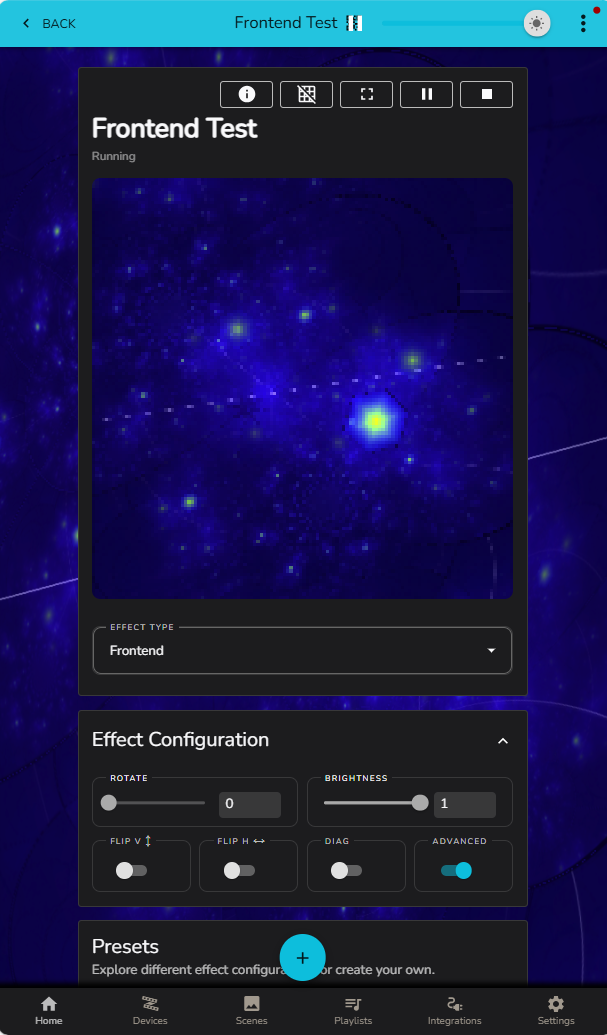
Incoming frames are automatically resized to match the target matrix dimensions using bilinear interpolation, so the capture resolution does not need to match the physical device.
How It Works
Enable the BG Visualiser in the LedFx frontend (Settings → Features).
Enable BG Visualiser to Frontend Effect
The frontend captures visualiser frames and sends them to the backend as an event
The Frontend effect receives and renders the content into the virtual.
If the browser tab with BG Visualiser loses focus to another tab in the host browser, or if the browser is minimised, the BG Visualiser effect stops rendering until focus is regained.
Enabling the BG Visualiser
The BG Visualiser and its capture feature are configured in the frontend under Settings → Features:
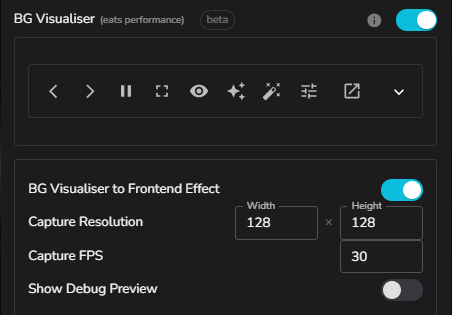
BG Visualiser to Frontend Effect — Master toggle. When enabled, the browser begins capturing and sending frames.
Capture Resolution — Width and height (in pixels) of the captured frame. Higher resolutions produce more detail but use more bandwidth.
Capture FPS — How many frames per second the browser sends to the backend.
Show Debug Preview — When enabled, displays a small overlay in the UI showing exactly what is being captured.
Multiple Frontends
If more than one browser tab or client is sending visualiser data, the effect locks to the first client to send a frame. All other clients are ignored with a one-time log warning.
If the active client stops sending (e.g. the page is refreshed or closed), the effect will automatically accept the next client after a 3-second timeout.
Settings
The Frontend effect has no effect-specific settings beyond the shared matrix controls.
ROTATE — Rotates the output by 90° for every unit.
BRIGHTNESS — Overall output brightness multiplier.
FLIP V — Flip the image top-to-bottom.
FLIP H — Mirror the image left-to-right.
Notes
The effect requires the BG Visualiser to be enabled and BG Visualiser to Frontend Effect to be turned on. If not configured, the matrix will remain blank.
Frame rate is determined by the Capture FPS setting in the frontend; no upsampling or frame interpolation is applied by the backend.
The effect is intended for use with 2D matrix virtuals. It will work on 1D strips but the resize from a 2D source will produce a single row of pixels.