How To: Complex Segments
Overview
Complex Segments is an advanced performance optimization mode for virtuals that significantly improves pixel mapping speed when using a high number of segments with span mapping. When enabled, it precompiles segment-to-device mapping data structures and uses efficient numpy scatter operations to achieve up to 13x faster frame rendering compared to the standard segment processing approach with thousands of segments configured.
What is Complex Segments?
Complex Segments mode changes how LedFx maps virtual pixels to physical device pixels. Instead of processing each segment individually during every frame render, it:
Precompiles mapping data - At configuration time, it builds numpy index arrays that define exactly where each virtual pixel should go on each device
Groups by device - It consolidates all segments targeting the same device into a single operation
Uses scatter indexing - It leverages numpy’s advanced indexing (fancy indexing) to update multiple non-contiguous pixel ranges in a single operation
This approach trades a small amount of memory for significant CPU time savings during frame rendering, which is critical for maintaining high frame rates.
When to Use Complex Segments
Complex Segments mode is beneficial when:
Many segments - Your virtual has numerous segments (e.g., 10+ segments across multiple devices)
Complex layouts - You have intricate LED installations with reversed segments, gaps, or non-contiguous mappings
Span mapping - You’re using span mode to spread an effect across multiple segments
Complex Segments have been developed and tested against virtuals with ~10 thousand segments, to support some of the more extreme physical setups out in the community.
When NOT to Use Complex Segments
Complex Segments may not provide benefits when:
Simple configurations - Simple virtuals with a handful of segments. Simple virtuals will run slightly slower if set as complex_segments.
How It Works
Compilation Phase
When Complex Segments mode is enabled, LedFx performs a one-time compilation:
Builds device buffers - Groups segments by target device_id
Creates index arrays - For each device, builds two numpy arrays:
src: Virtual pixel indices to read from the effect outputdst: Device pixel indices to write to on the physical device
Handles reversals - Segments marked as reversed have their source indices flipped
Filters invalid devices - Removes references to non-existent devices
The compiled data structure looks like:
_device_remap = {
    "device_1": {
        "src": np.array([0, 1, 2, ..., 50]),  # Virtual pixels
        "dst": np.array([10, 11, 12, ..., 60])  # Device pixels
    },
    "device_2": {
        "src": np.array([51, 52, 53, ..., 100]),
        "dst": np.array([0, 1, 2, ..., 49])
    }
}
Render Phase
During each frame render, the optimized flush path:
Extracts pixels - Uses
pixels[src_indices]to gather the relevant pixels in one operationApplies oneshots - Processes any oneshot effects on the extracted segment
Sends scatter data - Transmits pixels with target indices to the device using scatter mode:
(pixels, dst_indices)Device updates - The device uses fancy indexing to scatter pixels to the correct locations:
self._pixels[dst_indices] = pixels
This eliminates the overhead of iterating through segments and performing individual range assignments.
Diagnostic
If an effect is set to advanced / diag True, then LedFx will emit diagnostic to Teleplot.
This now includes a 1-second average of time to flush a virtual.
This can be used to monitor the performance of the complex_segments implementation and compare against the not complex_segments behaviour.
For example using virtuals from test config virtuals_remapping_hell.json
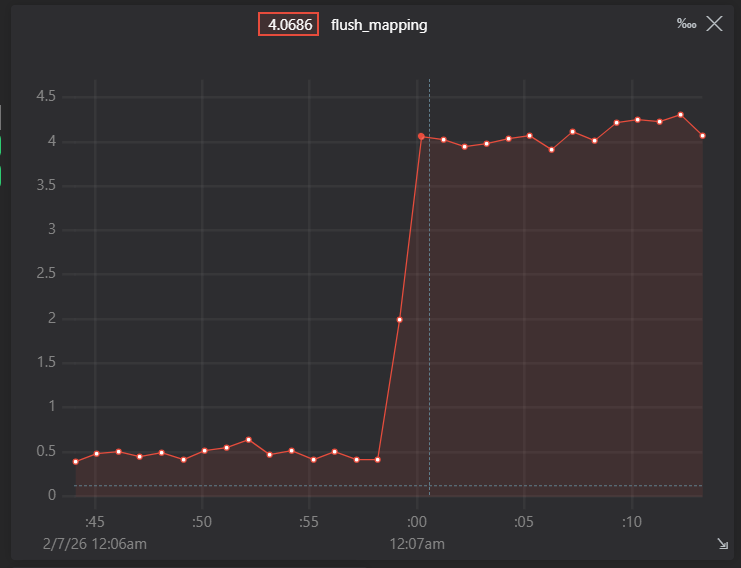
For the truly extreme complex virtual of 4096 segments into 2 target devices in a chess board pattern called mapping ( or mapping2 ) the following performance graph shows the difference between running initially in complex which is fast, followed by the legacy simple segments mode.
In this arbitrary capture, shows a complex performance of 0.4 ms vs 4 ms for the legacy implementation.
Conversely using complex_segments with relatively simple segment configurations such as the example stripey in the same example config file, that only has 5 segments across 2 devices.
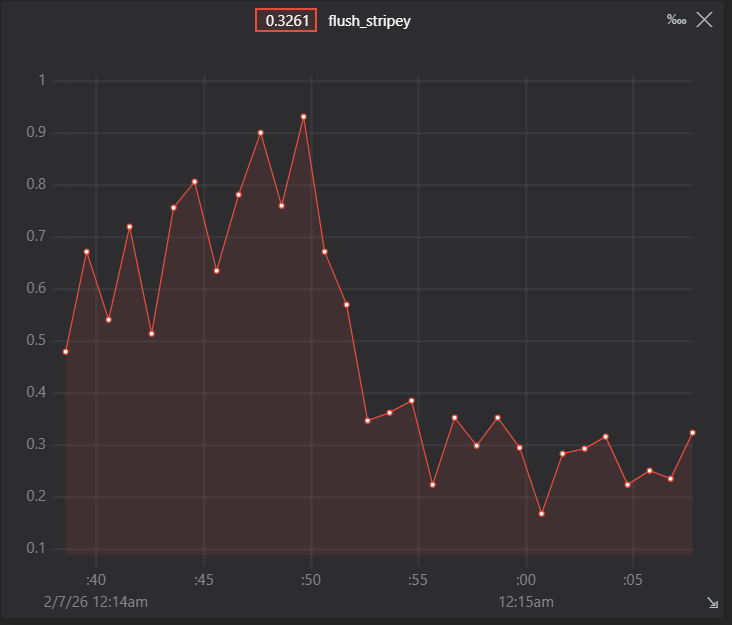
It can be seen that complex segments in this case is running at approx 0.6 vs 0.3 ms. So complex segments in this simple case is not an advantage, though not terrible…