Digital Rain
Overview
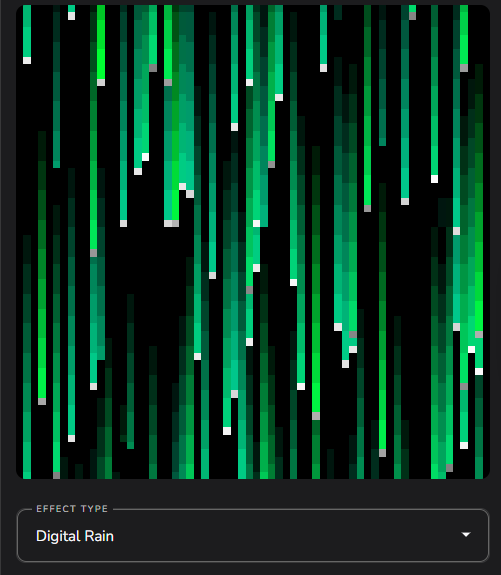
Digital Rain is a matrix effect that simulates the iconic falling code effect seen in The Matrix films.
It is audio reactive, using low, mid, and high band-pass audio filters to control the speed of falling code lines. The audio energy is injected into the movement speed, causing the code to cascade faster during musical peaks and slow during quiet moments.
The effect creates vertical “code lines” that fall from top to bottom, each with a glowing head and a fading tail. Colors are assigned from a configurable gradient, with each line getting a random color from the gradient spectrum.
Note
Digital Rain renders many individual code lines with multi-segment tails, which can be CPU-intensive on large matrices. If performance is a concern, reduce the Count or Tail Segments settings and monitor frame time in Advanced → Diag switch.
Presets
Digital Rain includes several themed presets that showcase different visual styles:
RESET — Classic green Matrix aesthetic with moderate settings (default).
MATRIX FAT — Thicker code lines with darker green gradient, slower movement, and shorter tails. Creates a bolder, more visible effect.
MATRIX TINT — Thin code lines with green-to-orange gradient accent and moderate tails. Adds warm color variety to the classic look.
RAINBOW — Full spectrum rainbow gradient with thick lines, slower fall, and longer tails. Creates a colorful, psychedelic falling code effect.
RGB — Distinct red, green, and blue bands in the gradient with moderate line width. Creates clearly separated color zones in the falling code.
SNOWFIELD — Black-to-white gradient with very thick lines. Creates a snowfall or static-like appearance rather than code.
Settings
The Digital Rain effect includes several unique controls:
GRADIENT — Color gradient used to assign colors to each code line. Each line picks a random color from the gradient. Classic green gradient for Matrix-style code, but can be customized to any color scheme.
COUNT — Number of code lines in the matrix as a multiplier of matrix pixel width. Higher values create more lines and a busier effect.
ADD SPEED — Number of code lines to add per second. Higher values create a denser, more continuous cascade. Lower values create sparser, more distinct lines.
WIDTH — Width of code lines as a percentage of matrix width. Thicker lines are more visible on large matrices, while thin lines create a more authentic code appearance.
RUN SECONDS — Minimum number of seconds for a code line to run from top to bottom. Base speed for falling code. Audio reactivity adds to this speed. Lower values create faster-falling code.
TAIL — Code line tail length as a percentage of the matrix height. Longer tails create more dramatic streaks across the matrix.
MULTIPLIER — Audio injection multiplier that controls how strongly audio affects line speed. At zero, the effect is non-audio-reactive and code falls at a constant speed. Higher values make the code speed highly responsive to music.
Advanced Settings
TAIL SEGMENTS — Number of segments used to render each code line’s tail. More segments create smoother fading tails but increase CPU usage. Fewer segments are more performant but may look chunkier.
IMPULSE DECAY — Decay filter applied to the audio impulse. Lower values create smoother, more sustained speed changes. Higher values create sharper, more immediate responses to audio.
Wake up, Neo… The Matrix has you. 💚