Artnet Device
Artnet is a common implementation of DMX over Ethernet. It is widely used in the lighting industry and is supported by a large variety of devices.
For more information, see Art-Net on Wikipedia.
The ways of Artnet are varied and unstructured. LedFx users, with real world needs have led to some unique capability in LedFx to support Artnet for
RGB Reordering
RGBA / RGBW White channel support
Multiple devices in one universe with bespoke pre and post amble bytes
The challanges here are specifc to Artnet, so hopefully if you have read this far, you recognise the need and can wield these for your unique problems.
Device Configuration
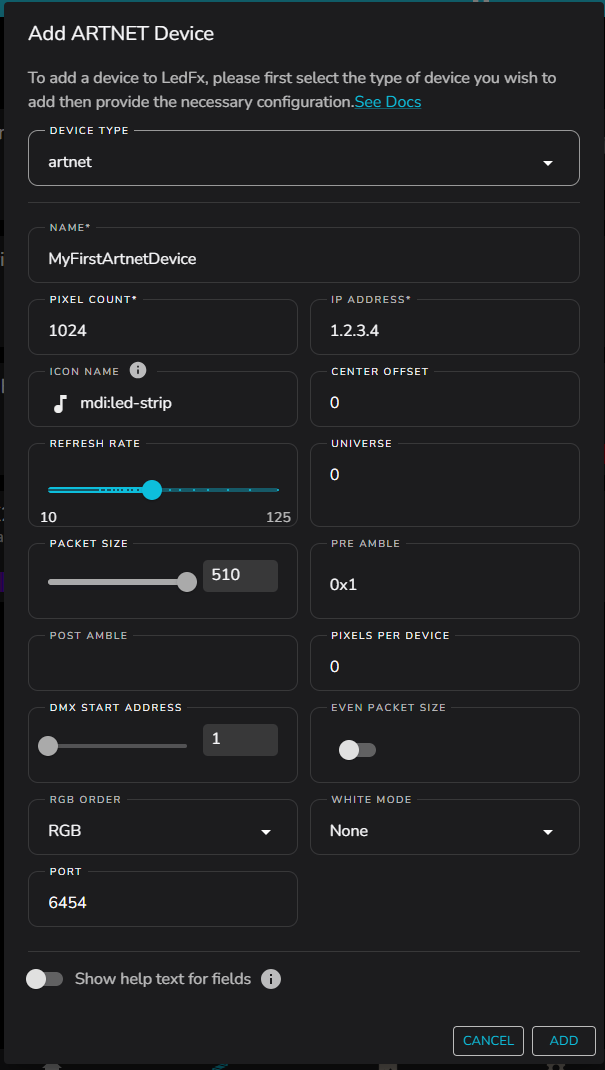
Generic Parameters
Many of the configuration parameters for artnet are common to any network connected devices.
These include:
Pixel Count — Number of addressable pixels in device
IP Address — IP4 address of device
icon name - This is the icon that will be displayed in the UI, select something that makes sense to you. It is a string entry field, from MDI ( Material Design Icons ) or MUI ( Material UI Icons )
If using MDI the string should be preceeded by mdi:
“mdi: <icon-name-in-kebab-case>”
If using MUI the string should be just the icon name with out a prefix
“<iconNameInCamelCase>”
Center Offset — Simple offset of effect mapping into the device pixel layout
Refresh Rate — Rate at which the effect will be updated and pushed towards the device
Port — IP port that will be used for transmitted packets. Default 6454
Artnet Specific Parameters
Universe — DMX universe identifier
Packet Size — Size of data packets
DMX Start Address — Starting DMX channel address
Even Packet Size — Some receivers require even packets, so it can be enforced with this option
RGB Order
As some artnet devices have uncommon RGB ordering and it is not possible to cofigure the device itself to deal with the reordering, users have sort a way to have LedFx handle color channel ordering.
Note this is a specific feature for Artnet, in general endpoint devices should follow their defined protocols, and abstract RGB ordering away.
The default order is RGB, but all 6 possible combinations can be chosen from.
RGB, RBG, GRB, GBR, BRG, BGR
White Mode
Some artnet devices will support a white channel, also sometimes referred to as amber channel, hence RGBW or RGBA
The White Mode option can be used to add the optional white channel and select the preferred alogrithmic handling. RGB order will still be observed.
None - No white channel, pixel encoding is RGB only.
Zero - A white channel is added, but always value zero.
Brighter - The lowest common value of RGB channels will be used for the white channel, RGB channels will remain their original value. This gives a bright rendering making use of the white channel LEDs.
Accurate – The lowest common value of RGB channels will be used for the white channel, RGB channels will then be reduced by this value. This give the most accurate color representation.
Pre and Post Amble
To support Artnet devices, it is important to be able to set fixed values in channels that can be positioned before or after the RGB data, for example, to control brightness.
In LedFx, these values can only be static, but the simple implementation
of pre-amble and post-amble values supports most simple devices.
The pre-amble and post-amble fields can be treated as comma or
space-separated values from the uint8 range (0-255).
Common Use Cases
Single Pixel RGB Device with Brightness Before RGB Data:
Set the pre-amble to
255for maximum brightness and leave the post-amble empty.The resulting channel data sent to the Artnet device universe will be in the format:
[255, R, G, B]
Single Pixel RGB Device with Brightness After RGB Data:
Set the post-amble to
255for maximum brightness and leave the pre-amble empty.The resulting channel data sent to the Artnet device universe will be in the format:
[R, G, B, 255]
Pixel RGB Device with Brightness and Additional Channels:
Set the pre-amble to
255, 0, 0, 0for maximum brightness with other channels turned off. Leave the post-amble empty.The resulting channel data sent to the Artnet device universe will be in the format:
[255, 0, 0, 0, R, G, B]
Pixels per Device for Multiple Devices
It is common to have multiple Artnet devices on one universe with the
same channel format. Each device requires its own pre- and post-amble.
The pixels_per_device field can be set to the number of pixels assigned to
each device. LedFx will then consume that number of pixels serially,
wrapping each set with pre- and post-amble sequences until all pixels
are used. Any leftover pixels are ignored.
If pixels_per_device is set to 0, all pixels are sent to the first
device, wrapped with the pre- and post-amble sequences.
Examples
Configuration:
Pixel Count: 6
Pre-amble:
255Post-amble:
0, 0
Results:
With pixels_per_device set to 0:
[255, RGB1, RGB2, RGB3, RGB4, RGB5, RGB6, 0, 0]
With pixels_per_device set to 1 (6 endpoints with 1 pixel each):
[255, RGB1, 0, 0, 255, RGB2, 0, 0, 255, RGB3, 0, 0, 255, RGB4, 0, 0, 255, RGB5, 0, 0, 255, RGB6, 0, 0]
With pixels_per_device set to 2 (3 endpoints with 2 pixels each):
[255, RGB1, RGB2, 0, 0, 255, RGB3, RGB4, 0, 0, 255, RGB5, RGB6, 0, 0]
With pixels_per_device set to 3 (2 endpoints with 3 pixels each):
[255, RGB1, RGB2, RGB3, 0, 0, 255, RGB4, RGB5, RGB6, 0, 0]
With pixels_per_device set to 4 (1 endpoint with 4 pixels, last 2 pixels
dropped):
[255, RGB1, RGB2, RGB3, RGB4, 0, 0]